Client
Plus
Industry
Retail
Responsibilities
Stakeholder interviews, Product management, Research analysis, UX/UI Design
Team
Product League

Reporting app
Plus
Retail
Stakeholder interviews, Product management, Research analysis, UX/UI Design
Product League

As one of the Netherlands’ leading supermarket chains with more than 400 stores, Plus Retail inevitably faces various calamities across its locations, including theft, fire, power outages, and robberies. To manage these situations effectively, the company has established a (physical) playbook that guides supermarket managers through the appropriate response actions for each type of incident.
Multiple challenges of the current way of working became apparent during the research:

A mobile app (for reporting) and a back-office app (for managing the calamities and descriptions), developed in parallel.
The project only took up 4 sprints (2 months) in a lean project setup.

The team consisted of 4 members: 1 UX/PO, 2 developers and 1 tester. With a combined UX/PO role, I took up the responsibility of business analysis, design and stakeholder and project management.
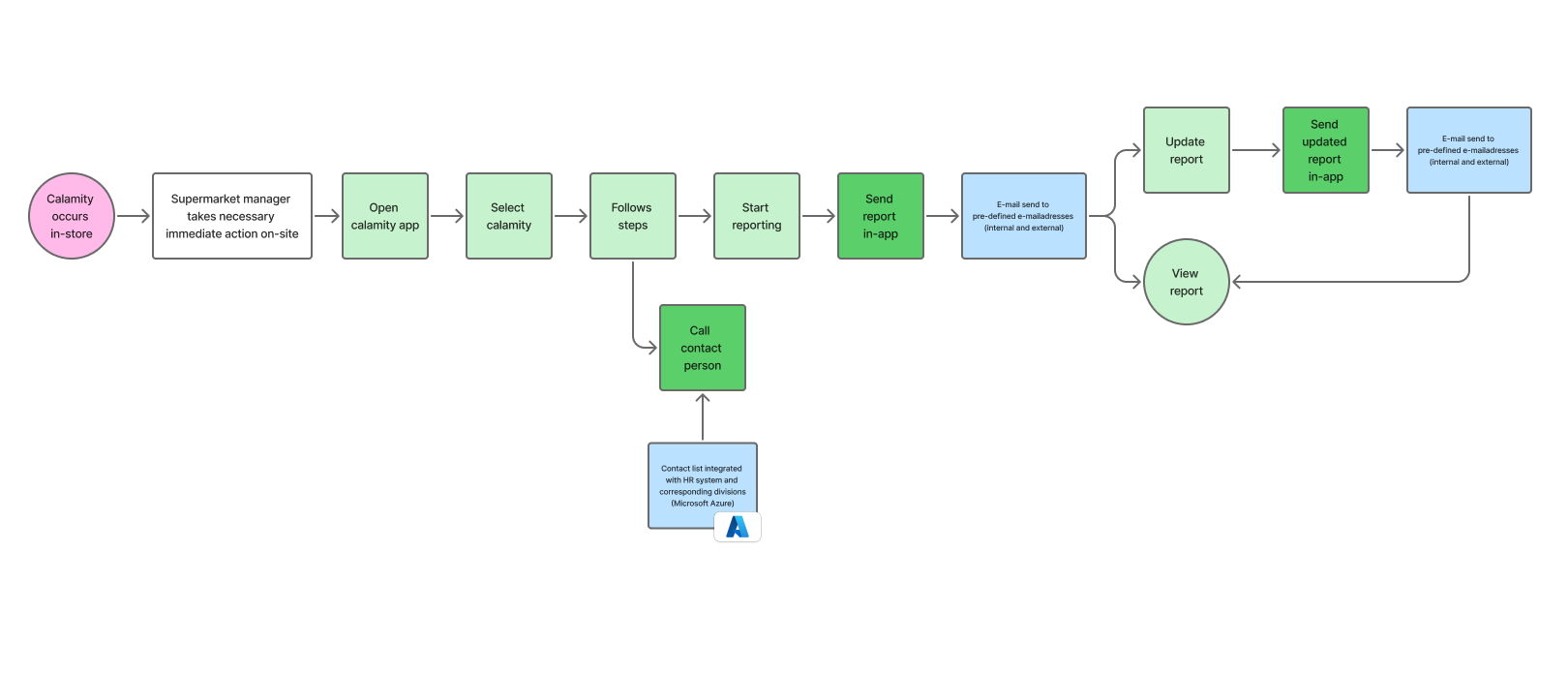
The mobile reporting app enables supermarket managers to access calamity information and complete the reporting process efficiently. By replacing physical on-site documentation with a mobile solution, the app ensures that the right people have access to critical information exactly when they need it.
Upon opening the app, users select the relevant calamity and are presented with a clear, step-by-step guide outlining the necessary actions to take. Each calamity is linked to the appropriate division, and one of the typical steps involves contacting a regional manager from that specific division. Contact details remain current through integration with Microsoft Azure, ensuring users always have access to the most up-to-date information.
After completing the immediate response steps, users can begin the formal reporting process through a five-step wizard. This guided interface allows them to input all relevant information and details about the calamity. Before submission, users can review their entries on a summary page. Once the report is sent, a predetermined group of recipients—specific to each calamity type—receives an email notification.
The app also supports ongoing documentation, allowing users to return to their reports at any time to add further details or describe how the situation was resolved. These updates are sent to the same group of recipients, maintaining clear communication throughout the calamity management process.

The back-office (desktop) app is only accessible for the product owners. They can make changes to the description of the calamities or add new calamities if needed.